How to SCP / SFTP Files to Home Assistant
26 Aug2023
it took me a while to figure out how to copy files with scp to Home Assistant.
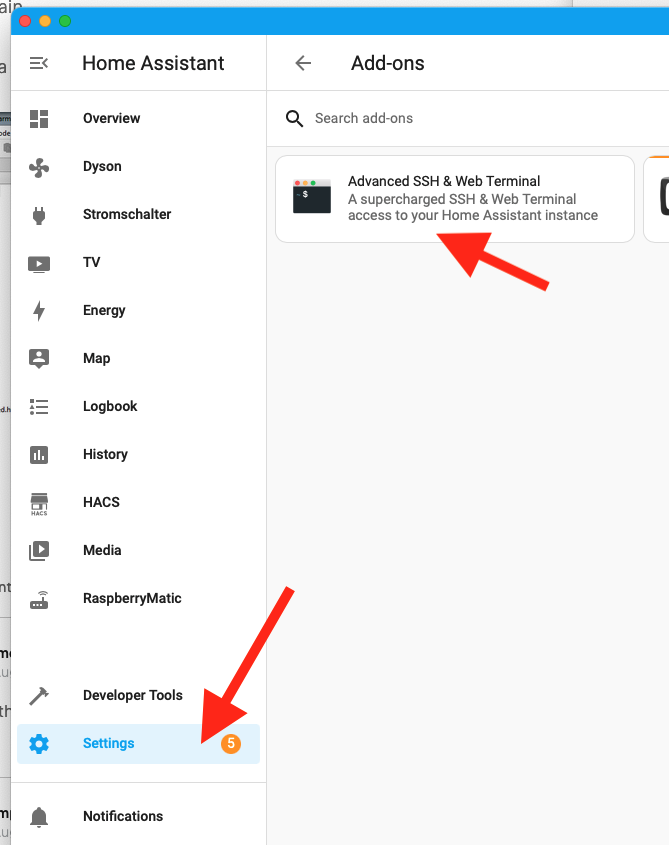
Go to “Settings” > “Add-Ons” > “Advanced SSH & Web Terminal”
Then switch to the “Configuration” Tab, change username to root and enable the sftp option, then click safe:
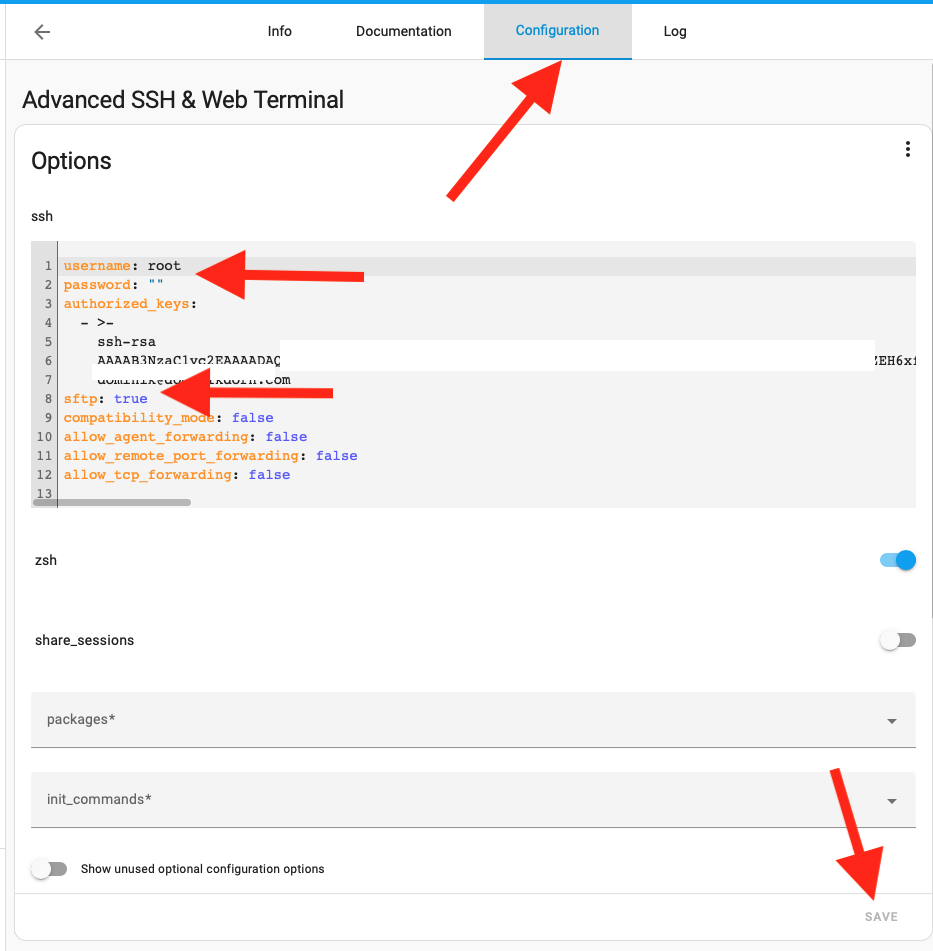
Restart your Home Assistant Installation.. after everything is up again, you should now be able to SCP/SFTP files to your Home Asistant.
- In: Uncategorized
Synology Cloudflare DDNS
17 Apr2023
I have a domain that I manage through Cloudflare, e.g. dominikdorn.com. There I have a subdomain that should point to my public IP, e.g. nas.dominikdorn.com .
Synology Scripts
Create the “Update the IP Script”
Put this script into a stable place, e.g. /var/services/homes/domdorn/root/cloudflare_update_ddns.sh
Putting it into a stable place is important to not lose it when you update your DSM.
#!/bin/bash

# Check if the correct number of arguments is provided
if [ "$#" -ne 4 ]; then
  echo "Usage: $0 <CF_ZONE_ID> <CF_BEARER_TOKEN> <CF_DOMAIN_NAME> <IP>"
  exit 1
fi

# Get the input parameters
CF_ZONE_ID="$1"
CF_BEARER_TOKEN="$2"
CF_DOMAIN_NAME="$3"
IP="$4"

# Get the DNS record ID
RESPONSE=$(curl -s -X GET "https://api.cloudflare.com/client/v4/zones/$CF_ZONE_ID/dns_records?type=A&name=$CF_DOMAIN_NAME" \
     -H "Authorization: Bearer $CF_BEARER_TOKEN" \
     -H "Content-Type: application/json")

# Extract the Record ID from the JSON response
CF_RECORD_ID=$(echo $RESPONSE | jq -r '.result[0].id')

# Update the DNS record with the new IP address
curl -X PUT "https://api.cloudflare.com/client/v4/zones/$CF_ZONE_ID/dns_records/$CF_RECORD_ID" \
     -H "Authorization: Bearer $CF_BEARER_TOKEN" \
     -H "Content-Type: application/json" \
     --data "{\"type\":\"A\",\"name\":\"$CF_DOMAIN_NAME\",\"content\":\"$IP\",\"ttl\":120,\"proxied\":false}"Code language: PHP (php)
Make sure the script is executable, by issueing chmod +x /var/services/homes/domdorn/root/cloudflare_update_ddns.sh
Add the Provider to the list of DDNS Providers
Add the following code to /etc/ddns_provider.conf
[USER_Cloudflare_dodo]
	queryurl=https://cloudflare.com/
	modulepath=/var/services/homes/domdorn/root/cloudflare_update_ddns.shCode language: JavaScript (javascript)
Cloudflare Configuration
Get the required parameters from Cloudflare
First, login into your cloudflare account, then select the domain you want to use. There copy the Zone-ID
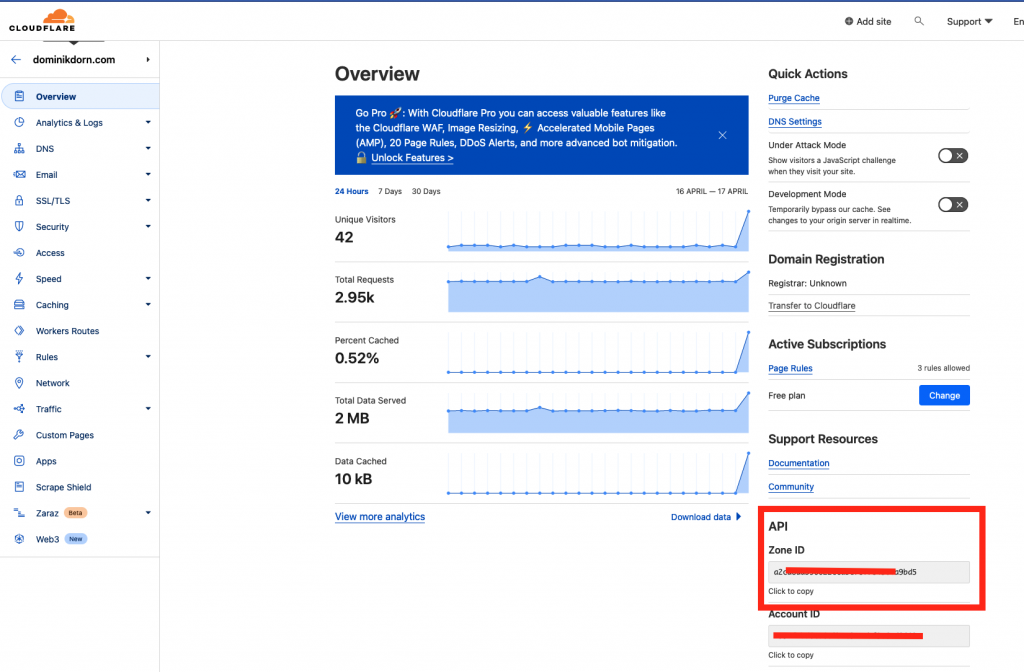
Create an API Token
Next, you need to create a API Token that is capable of modifying this domain. Click on “Get your API Token” or go directly to https://dash.cloudflare.com/profile/api-tokens
There create a new token, select “Custom Token” and configure it as follows:
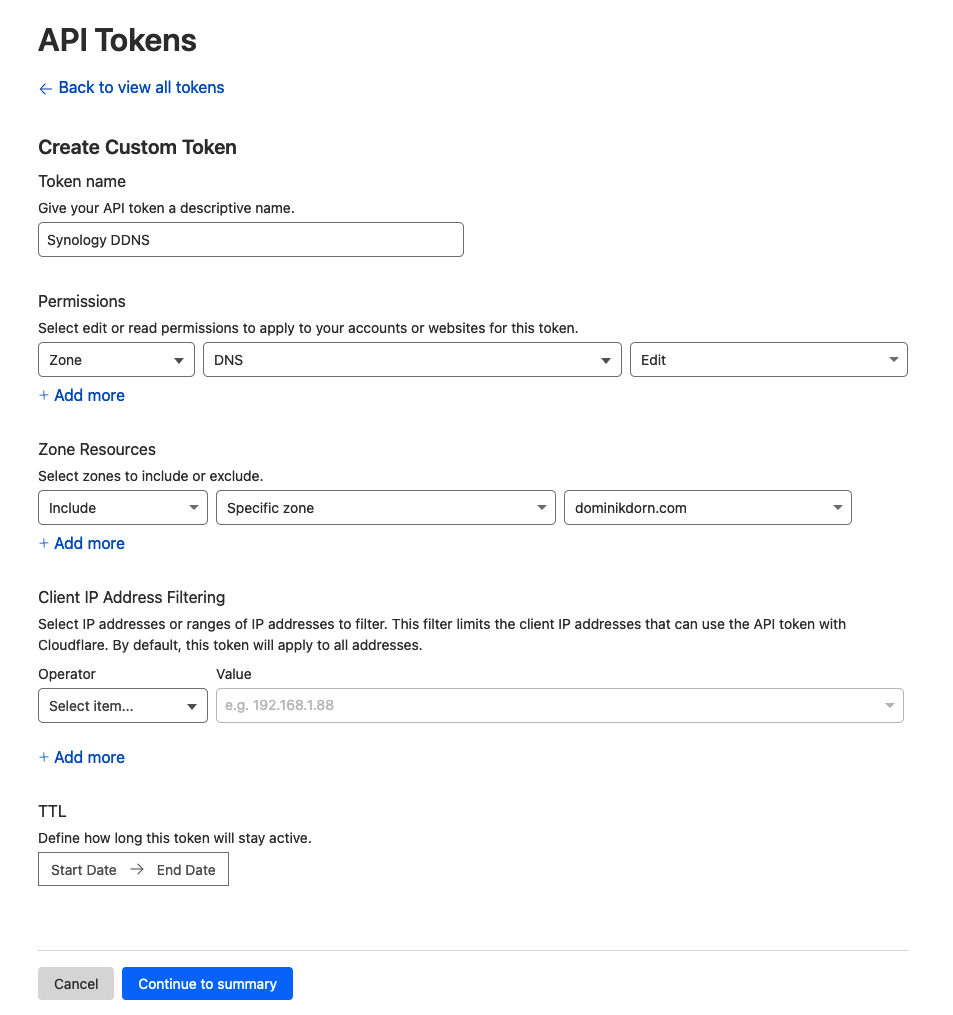
Token Name: Synology DDNS (or whatever you want)
Permissions: Zone -> DNS -> Edit
Zone Resources: Include -> Specific zone -> your domain name
IP Filtering: Leave blank or specify IP Ranges (if you know them)
TTL: Leave as it is.
-> Continue to summary
You’ll get a screen that looks like this
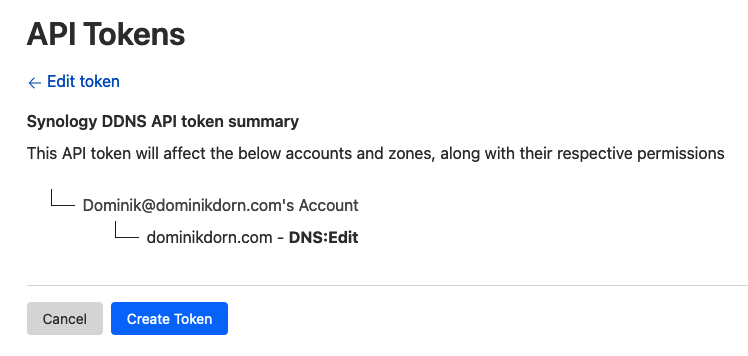
click “Create Token”
You’ll then get a screen like this
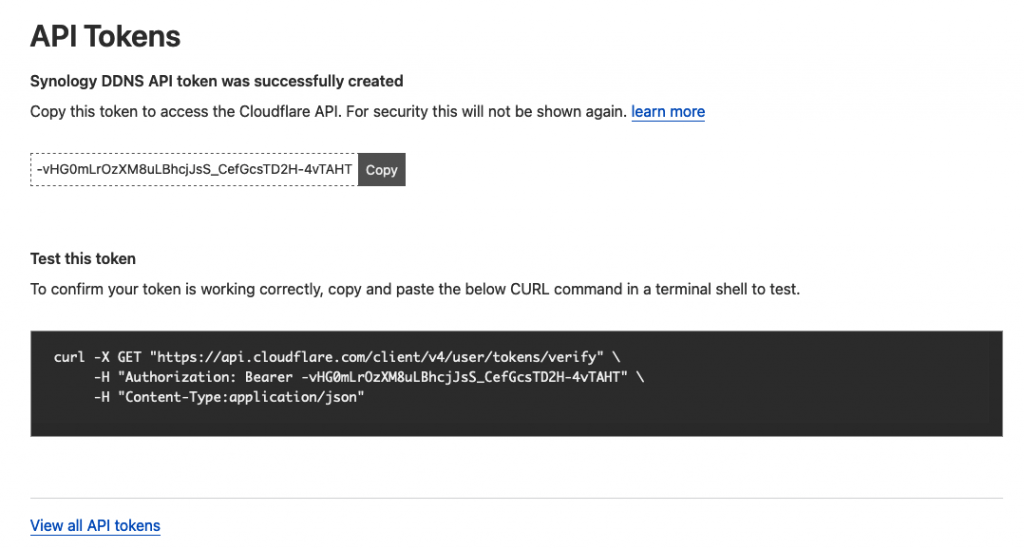
copy the API Token and store it in a safe place.
Create a new record in Cloudflare
Next you’ll need to create a new record in your cloudflare account in the domain, e.g. nas.dominikdorn.com
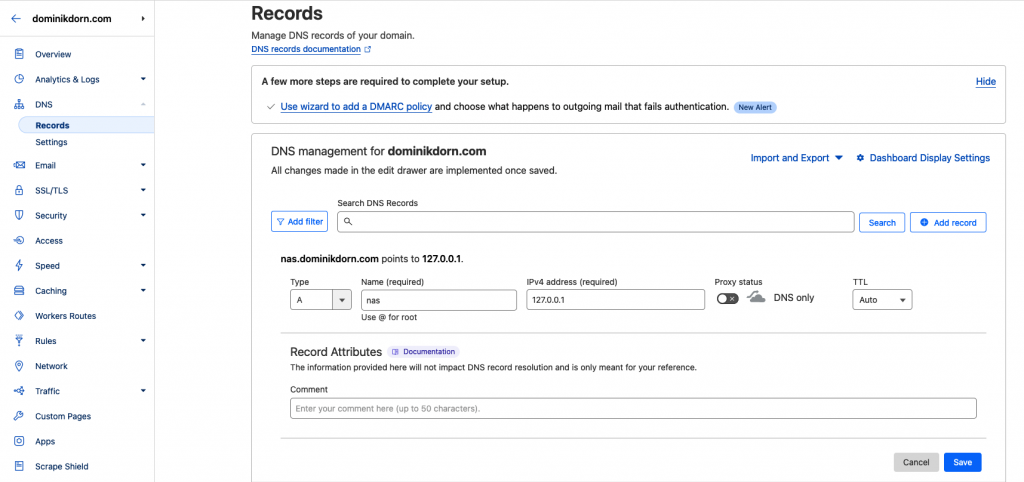
Type: A
Name: nas
IPv4 address: 127.0.0.1 (or any dummy ip for now)
-> save
Configuring your NAS
In your Synology NAS, go to System Settings (Systemsteuerung in German), then External Access (Externer Zugriff) and create a new DDNS Provider binding
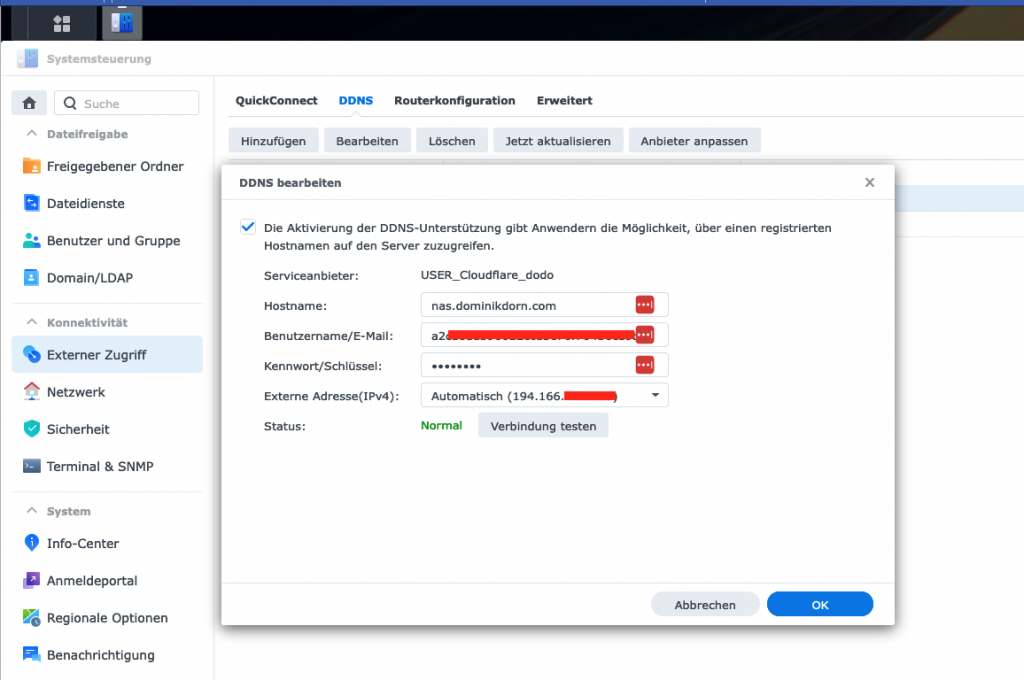
Configure as follows:
Hostname: the FQDN (full qualified domain name) of your record, in my case nas.dominikdorn.com
Username/Email: The Zone-ID of your domain name
Password/Key: The Token you previously saved
Press “Test connection” and then save the whole thing.
That’s it! Your NAS should now take care of updating your cloudflare hostname whenever the ip changes!
- In: Open Source|Programming
- Tags: DDNS, NAS, Synology
SBT, Artifactory Credentials & Jenkins Pipeline
14 Mar2021
In case you need to marry SBT + Artifactory with Jenkins Pipelines – and like me, you don’t want to post the Artifactory Credentials in a public accessible place on the Jenkins Agent, here comes your solution!
First, create a secret containing the username + token/password of the user that should be used by jenkins. In my case, this secret is called acme-jenkins-artifactory-access-token
Then, during your pipeline, get the secret in an environment variable and during the build, post it in a credentials.sbt in the current working directory. This way, sbt will pick up your credentials and uses them to authenticate against your Artifactory to resolve artifacts.
Alternatively you could also create a “secret file” which already has the contents I’m here creating during the build and then just copy that to the current working dir. As I don’t want to create yet another secret containing the same credentials, I’ve chosen this approach.
- In: Uncategorized
Adjust java.library.path at Runtime
13 Mar2021
At my current task, I had to make sure a native library is able to be loaded. I didn’t want to adjust the parameters of the JVM for this, so I had to patch the java.library.path at runtime.
This post is inspired by this post
So, this code (in Scala, but its quite similar in Java) consists of two parts:
- Getting the current value of the java.library.path system property
- Making sure its actually used by the JVM by doing some reflection hacky stuff.
Getting the current value of the java.library.path system property L7-16
This is straightforward. We do a System.getProperty and then just retrieve it, check if the path we want to add is already there or not. If not, we add it and then set the property.
Making sure its actually used by the JVM L18-23
This is the tricky part. We have to use reflection to get access to the sys_path field of the Classloader. This is usually set to the path where the RT.jar file is located. We make the field accessible, get its current value, then set it to null and set it back to its previous value. Changing the fields value actually triggers the reloading of the paths’, so that the java.library.path variable is read again and used from now on.
Compared to the inspiration post by Fahd Shariff, we make sure to set the sys_paths field back to a reasonable value, else the JVM is unable to use other native-functions, e.g. `java.nio` and you would get errors like:
[info] java.lang.ExceptionInInitializerError
[info] 	at java.base/sun.nio.fs.UnixFileSystemProvider.copy(UnixFileSystemProvider.java:258)
[info] 	at java.base/java.nio.file.Files.copy(Files.java:1295)
[info] 	at com.acme.calculation.demo.GamsIntegrationSpec.$anonfun$new$52(GamsIntegrationSpec.scala:278)
[info] 	at zio.internal.FiberContext.evaluateNow(FiberContext.scala:361)
[info] 	at zio.internal.FiberContext.$anonfun$evaluateLater$1(FiberContext.scala:775)
[info] 	at java.base/java.util.concurrent.ThreadPoolExecutor.runWorker(ThreadPoolExecutor.java:1128)
[info] 	at java.base/java.util.concurrent.ThreadPoolExecutor$Worker.run(ThreadPoolExecutor.java:628)
[info] 	at java.base/java.lang.Thread.run(Thread.java:834)
Code language: PHP (php)- In: Uncategorized
Jenkins Git HTTP Authorization + .netrc
13 Mar2021
Recently I had to push in a Jenkins Pipeline to a git repository that was only accessible through https with username + password.
Attempts to provide the password in the url like https://user:p@s$w0rd@host.com/ failed, as apparently the password contained already a @ character and thus messed up the url.
A good colleague pointed me to .netrc which apparently is used, as git itself is using curl under the covers. The only problem was, that – from what is publicly documented – the .netrc file has to be in the $HOME folder, which would mean, that all other jobs on the Jenkins instance could also use our credentials.. while in theory possible, its a NOGO in our situation.
In the end, I’ve ended up with this solution.
- retrieving the credentials to be used and store them in an environment variable
- create a local .netrc file in the project directory
- then, when using git, override the $HOME variable and set it to the current directory (pwd), thus making git treat the current directory as the users home and look here for the .netrc file instead of the real home, which could be accessed by other users.
- In: Uncategorized
At my current project, we use snapshots for versioning certain important states in our application. As we have the requirement to “jump back” to these states for some specialised queries, we needed a way to access a specific snapshot, without having to create a Persistent-Actor / Eventsourced-Behaviour that could mess up the journal of that Entity or would start to consume the event-log after loading the snapshot.
So, basically what we needed is the future-api that is already defined in SnapshotStore.scala in Akka.
Unfortunatelly, this API is not easily accessible, as it can only be implemented inside an Actor and we’re not supposed to access an actors internal state from the outside, thus making it impossible to use the already provided Future-based API.
As a workaround, I’ve created these “helpers” to easily access the snapshot-store and interact with its API.
Here, I first extracted (bascially copy-pasted) the future based API from SnapshotStore.scala, so I can easily reference the type later – I called this trait SnapshotStoreBase.
Then I created the “SnapshotStoreAccessor”, which basically given the ActorRef of a SnapshotStore gives you access to its Future-based API.
So by now, we have a trait that models the future-based way of accessing the Snapshot-Store and an implementation that allows us to access this using the Ask-Pattern.
What is still missing is a way to get a hold on the ActorRef of the SnapshotStore, so we can use that one together with the SnapshotStoreAccessor.
For this, I created the SnapshotStoreGetter:
Here, we first have a Method “getSnapshotStoreActorRef” which uses an internal Akka API to get the reference to the SnapshotStore actor of the given “snapshotStorePluginId”. As the underlying method in akka.persistence.Persistence is scoped to the akka package, we have to make sure this accessor is also in the akka package.
The “getSnapshotStoreFor” method than just takes that ActorRef and created the SnapshotStoreAccessor. Finally, the “getSnapshotStore” is our public API, giving access to the future-based API by just providing the ID and an implicit ActorSystem.
So how do we now use this to access our Snapshot? Easy! Just look at this example:
- In: Scala|Uncategorized
- Tags: Akka
Slick PostgreSQL: could not find implicit value for parameter tt: slick.ast.TypedType[List[xxx.UseCase]]
19 Jan2021
When you’re using PostgreSQL together with Slick, chances are high, that you’re also using the Slick-PG library. You probably came to this post, because you try to map your custom ADT to a List/Sequence of that and want to store it as a text[] (or other array) in PostgreSQL. When trying to do so, the compiler gave you an error like:
could not find implicit value for parameter tt: slick.ast.TypedType[List[xxx.UseCase]]
You already tried creating a MappedColumnType[UseCase, String], but for some reason, Slick hasn’t picked it up / is not using it for Sequences / Lists.
Go no further, the solution is near!
Simply create a new JdbcType[List[YourType]] based on the SimpleArrayJdbcType[String] and then use the mapTo[YourType] method.
I hope you found this helpful!
- In: Uncategorized
Scala HMac SHA256
21 Nov2020
As I repeatedly (e.g. every 2nd year) have to find the right code to generate a HMAC SHA256 hash from a string, I’m sharing this (for me and others) here. The tricky part is the String-Format to 64 chars. Most code I’ve found had this set to 32 chars (like used for MD5) which resulted in too short hashes for certain inputs.
I hope you find this useful!
- In: Uncategorized
Akka-HTTP + Play-JSON Inheritance hierarchies
18 Sep2020
This is mainly a note to self on how to build inheritance hierarchies (e.g. Animal -> [Cat / Dog] ) with Play-JSON.
Documentation can be found here:
- In: Uncategorized
As mentioned in my previous articles about using VAVR together with Spring, use the following classes to make VAVRs Option and all Collection types based on Seq work correctly with SpringDoc. Just place them in a package that gets scanned by Spring!
A big shoutout to bnasslahsen who provided me with the VavrOptionSupportConverter that I adjusted to work with the collection types (see this issue)
- In: Uncategorized